Installation
Install the Microsoft-Extractor-Suite toolkit:
Install-Module -Name Microsoft-Extractor-Suite
Install the Powershell module Microsoft.Graph for the Graph API Beta functionalities:
Install-module -name Microsoft.Graph
Install the Powershell module ExchangeOnlineManagement for the Microsoft 365 functionalities:
Install-module -name ExchangeOnlineManagement
Install the Powershell module Az for the Azure Activity log functionality:
Install-module -name Az
Install the Powershell module AzureADPreview for the Azure Active Directory functionalities:
Install-Module -Name AzureADPreview
Note
If you receive an error message indicating that the specified commands already exist on your system, you can resolve the issue by including the “-AllowClobber” parameter in the “Install-Module” command. This parameter will allow the installation process to overwrite any existing versions of the module and replace them with the newer version.
Getting Started
To get started with the Microsoft-Extractor-Suite tool, make sure the requirements are met.
The first step is to import or install the Microsoft-Extractor-Suite.
To import the Microsoft-Extractor-Suite:
Import-Module .\Microsoft-Extractor-Suite.psd1
To install the Microsoft-Extractor-Suite:
Install-Module -Name Microsoft-Extractor-Suite
Additionally, you must sign-in to Microsoft 365 or Azure depending on your usage before Microsoft-Extractor-Suite functions are made available. We made a graphic to help you decide which Connect function you should use depening on what you wan to acquire.
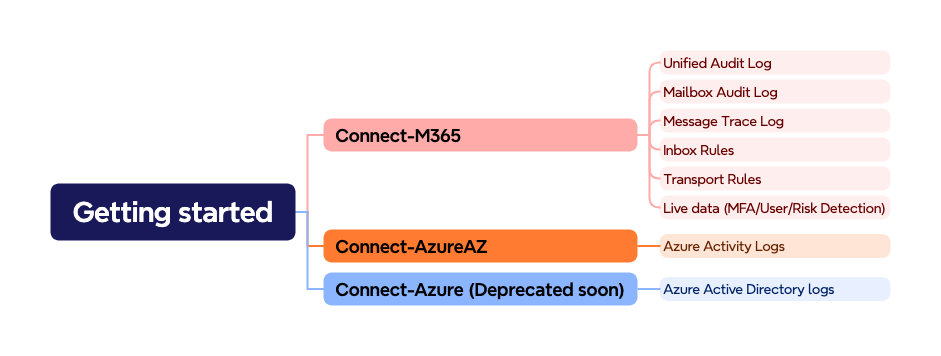
To sign in, use the following cmdlets:
Connect-M365
Connect-Azure
Connect-AzureAZ